


Table of Contents
Your strategic choices as CTOs and IT directors who oversee enterprise software portfolios will determine how to handle the ongoing problems that stem from Silverlight and LightSwitch-based legacy applications. Yes, some businesses still use Silverlight- and LightSwitch-based applications in 2026, and they are increasingly part of core business processes. These systems maintain substantial business value because they operate reliably, are fully understood by organizations, and seamlessly integrate with all operational processes. Yet they also represent mounting technical debt and security concerns. Also, WPF (Windows Presentation Foundation)-based applications face platform limitations (Windows-only), deployment complexity, UI modernization gaps, performance and resource constraints, maintenance challenges, accessibility and security considerations. The question isn’t whether to modernize, but how to do it without disrupting the business or exhausting the budget.
This article examines what makes OpenSilver relevant for enterprises, how it enables a pragmatic modernization strategy, and where its use cases shine – or fall short. Its latest release, version 3.3, released in late January 2026, enables running Blazor UI components within XAML applications, which opens another dimension for future modernisation of legacy apps, and even building new ones by invoking the possibility for the usage of modern UI libraries and making the look and feel of the business applications closer to the modern trends for user interface.
1. Understanding the Problem: Why Legacy Applications Become Business Liabilities
Legacy Silverlight applications present several interconnected business problems. In a nutshell, Microsoft ended support for Silverlight in 2021, which means no security patches, no browser compatibility updates, and growing vulnerability to threats. Modern browsers have systematically removed plugin support, forcing organizations to maintain aging infrastructure or ask employees to use outdated browsers – both unacceptable from a security standpoint.
Another perspective is the one related to the talents and team members responsible for maintaining, further improving, and developing the business-critical application. The talent pool for Silverlight development has largely moved on. When you need to fix a bug, add a feature, or integrate with a new system, finding developers who can work effectively in these frameworks becomes increasingly difficult and expensive. Every month that passes makes this problem worse.
WPF applications face a different but equally challenging issue. WPF remains a stable, supported technology for Windows desktop apps, with no announced end-of-life from Microsoft in 2026 (as of mid-February 2026). WPF applications cannot run in browsers or on mobile devices. Usage persists in sectors such as finance, healthcare, and engineering due to WPF’s rendering performance and mature ecosystem, though modernization discussions favor hybrid approaches, including wrapping in WebView, migrating to MAUI/Blazor for cross-platform needs. Another solution to consider is migrating the legacy solution to OpenSilver, which renders to HTML DOM and runs on Linux, macOS, iOS, and Android.
In the years we live in, where remote work and mobile access are expectations rather than perks, desktop-only applications create serious operational constraints. Yet WPF codebases often represent years of refined business logic and user interface investment that would be prohibitively expensive to rebuild from scratch.
2. The Full Rewrite Trap
When confronted with these challenges, many organizations default to what seems like the clean solution: a complete rewrite using modern web frameworks like React, Angular, or Vue. The business case for rewrites typically promises modernization, better performance, and long-term maintainability.
The reality is usually quite different. Industry data consistently shows that full rewrites take 2-3 times longer than initially estimated, which can cost millions of dollars for enterprise applications, depending on the system’s complexity, and carry substantial business risk. During the 12-24 months (or longer) that development teams work on the new version, the legacy application still requires maintenance, meaning you’re effectively paying for two applications simultaneously.
More problematically, rewrites rarely preserve all the functionality of the original application. Years of refinements, edge case handling, and business rule adjustments tend to be incompletely documented. The new application launches missing features that users could consider essential, leading to frustrated adoption, expensive post-launch fixes, and sometimes outright rejection by user communities who preferred the old system despite its limitations. Although all features and functionality are available, users will need time and effort to learn how to use them.
From a business continuity perspective, the switchover from legacy to new application represents a single point of failure. If the new application has critical bugs or performance issues at launch, you cannot easily roll back months of data and user activity.
3. How to Convert WPF to a Web Application: The OpenSilver Approach
OpenSilver provides its own approach to updating existing applications from their previous versions. The system transforms the existing application’s code to WebAssembly during compilation, which allows the C# and XAML code to run inside contemporary browsers without needing any plugins. The app’s business logic, together with the user interface refinements and team knowledge base, will continue to serve as valuable assets instead of creating obstacles.
OpenSilver now enables users to integrate Blazor components, which introduces new possibilities by welcoming new generations of web developers who are familiar with Razor and existing Blazor UI component libraries such as Radzen, MudBlazor, and Blazorise, and those from DevExpress and Syncfusion. The development process allows developers to add contemporary Blazor components into their XAML applications. Your investment protection lets you choose between keeping your present system or getting new system parts that represent modern technology.
OpenSilver 3.3 introduces major enhancements that improve WPF compatibility through better support for commanding models, template selectors, and routed events. The framework enables organizations to move their Silverlight applications through LightSwitch while creating one technology platform that connects their various legacy systems.
The enhanced WPF compatibility system provides essential value to organizations that operate with large WPF application codebases. These organizations can update their applications through web application deployment while maintaining their current system structure, data connection methods, and MVVM programming models. The learning process for development teams who already know WPF remains brief, which results in reduced training expenses and accelerated team performance.
By bridging XAML and Blazor, OpenSilver 3.3 allows mixed teams of experienced WPF developers and modern web specialists to jointly evolve legacy applications into future-ready web solutions.
WebAssembly in Feb 2026
WebAssembly (Wasm) has matured into a production-ready technology by early 2026, powering high-performance apps in browsers, edge computing, and beyond.
Recent Developments
Safari achieved full cross-browser Wasm compatibility with features like exception handling and JavaScript builtins, boosting performance. WebAssembly 3.0 standardized 11 features including Garbage Collection, Memory64, and Relaxed SIMD, while WASI 0.3 launched in February 2026 with native async support for components. Adoption hit 5.5% of Chrome sites, with gains in .NET 10/11 (e.g., Uno Platform’s 2.5x AOT speedups) and Kotlin’s Wasm beta; Microsoft partnered on .NET multithreading.
Future Outlook
Expect .NET 12 (2027) to add GC/Memory64, alongside advancing Component Model for polyglot “Lego-brick” microservices via WIT interfaces. Wasm targets edge/IoT (small footprint for OTA updates), serverless plugins, and ESM integration to simplify imports like JavaScript modules; containers persist for heavy apps, but Wasm excels in event-driven scenarios.
4. Real-World Results: A Migration of an Application in the Financial Service Domain
In 2024, I served as a project manager on a migration project for a mid-sized financial technology company specializing in payments, security, and data services, with more than 1,500 employees. The project provides useful insight into what enterprise OpenSilver migrations actually look like from a business perspective.
The organization operates a barcode tracking system across six physical sites, handling the movement of financial documents, proof bags, and parcels through multiple courier networks. The application had been built in Silverlight and worked reliably, but the approaching end of browser plugin support created an unacceptable business risk. The organization couldn’t afford to have its critical tracking system suddenly stop working because Chrome or Edge dropped Silverlight support entirely.
Their Solutions Consultant spent several months evaluating options before recommending OpenSilver. The evaluation covered complete rewrites (too expensive, too risky, too long), other migration tools (insufficient maturity or vendor viability concerns), and doing nothing (unacceptable security and operational risk). OpenSilver represented the best balance of technical feasibility, business risk, and cost.
The application consisted of 87 XAML files and 468 source files, which represent a moderate-sized enterprise application. It included specialized third-party components like SL4PopupMenu and SilverlightContrib, complex data grid operations handling thousands of records, barcode scanning integration, label and manifest printing, and WCF service communication for database operations.
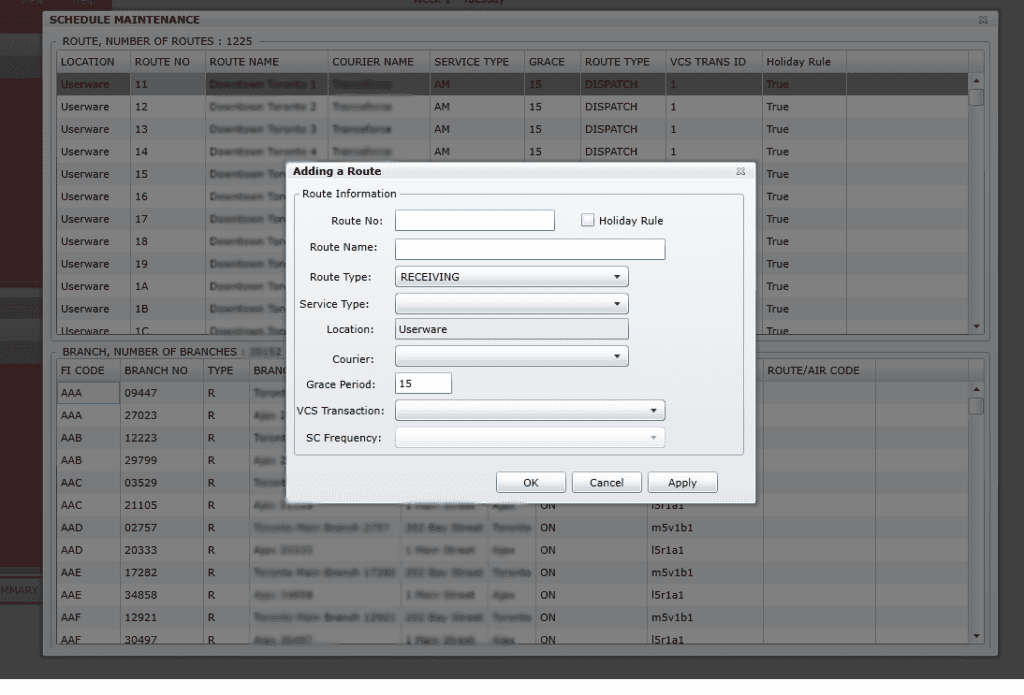
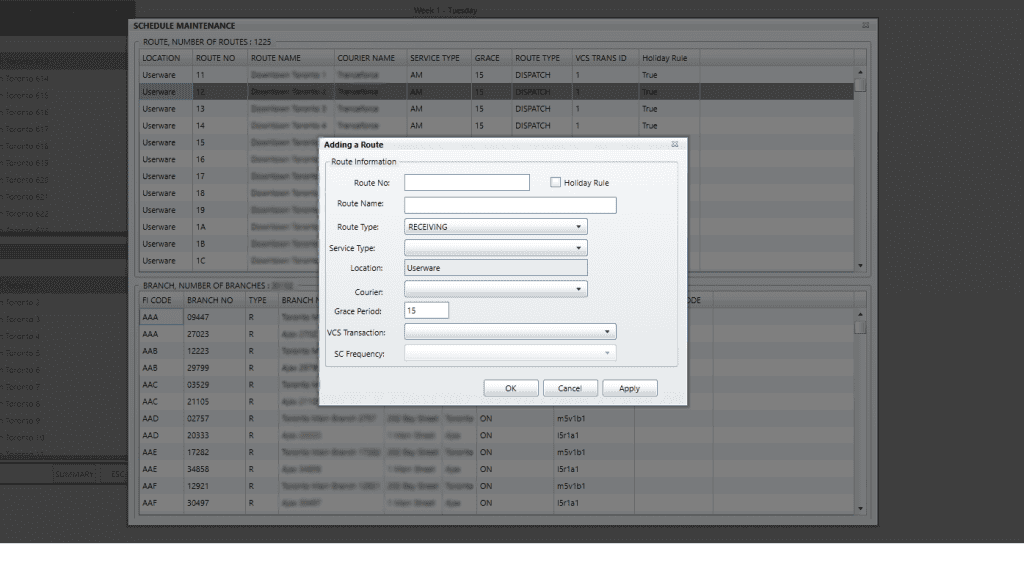
We structured the migration into six milestones over approximately five months. The “Compile” milestone got the code compiling with OpenSilver rather than Silverlight. The Alpha phases progressively restored functionality – first getting UI elements to appear correctly, then implementing the core business features like route scheduling and barcode scanning. We migrated data grids, delivered a Beta with complete feature parity, and, after comprehensive testing, a Release Candidate with zero bugs, as the client’s QA team completed the defined use cases.
The most instructive aspect was how we handled high-security requirements. Working with major financial institutions, the organization couldn’t provide us with production data or even realistic test data. We had to validate functionality using anonymized mock data and rely heavily on their team for testing against real scenarios. This added complexity, but was manageable with proper planning and close communication.
The project finished on schedule in October 2024. The organization’s team expressed high satisfaction with both the result and the process. The migrated application retained all original functionality, ran in modern browsers without plugins, and delivered performance improvements on some features. From their perspective, they preserved their business investment in the original application while eliminating the technical and security risks that threatened operations. Their tool was in production very fast after we delivered.
5. Where OpenSilver Makes Business Sense
OpenSilver provides a practical answer that works for particular business environments of enterprises. Organizations that have large Silverlight or WPF codebases that hold important business value will find the migration method more affordable than performing a full system rewrite. The process of application development, which spanned multiple years and required millions of dollars, should be updated through a 10-20% investment instead of completely rebuilding at 100-150% of the original cost.
Teams with strong XAML expertise can use their current abilities instead of needing to train their entire development team for new frameworks. Organizations require this information because their existing talent shortages generate major operational difficulties. An organization can advance through this situation by using its present team members to sustain work efficiency during the process of hiring new developers who possess contemporary development skills.
Applications with complex business logic that are imperfectly documented benefit especially. The system keeps its current logic from previous years because it avoids trying to rebuild it by studying the accumulated rules and edge cases that appeared during the migration process. I had the opportunity to perform reverse engineering of a complex business solution while wearing a Business Analyst hat. Without proper documentation, this is time-consuming and requires specific domain knowledge. The testing process aims to confirm that migration operations have not damaged current system operations, instead of proving that all business rules have been rewritten.
Organizations operating under strict regulatory frameworks, such as healthcare, finance, the public sector, and manufacturing, can achieve better equivalence proof between their applications through migration instead of rewrites. The actual code provides major benefits when you need to demonstrate that the new system performs calculations, data processing, and business rules at the same level as the audited legacy system.
The Blazor component integration in version 3.3 implements modernization through step-by-step development. Organizations should begin their transition by swapping specific controls and features with Blazor alternatives before they attempt to migrate their complete system to the new platform. The application lets users boost particular elements, including data grids for better search functions and text editors for advanced visual editing and interactive charts, through separate component improvements.
6. Where OpenSilver Doesn’t Fit
It’s equally important to understand where OpenSilver isn’t the right choice.
Greenfield projects starting from scratch will typically find pure Blazor, React, or other modern frameworks more appropriate at this point.
OpenSilver’s value proposition centers on preserving existing investment. If you don’t have that existing investment, you don’t need the migration capabilities.
Applications with minimal C# code and primarily HTML/JavaScript implementations won’t benefit from OpenSilver’s XAML and C# focus. If your Silverlight application is a thin XAML wrapper around JavaScript functionality, other migration paths will likely make more sense.
Very small applications that would require only a few weeks of work to rewrite fall into an interesting category. The migration overhead for OpenSilver may exceed the rewrite cost for trivial applications. The framework’s advantages emerge primarily with applications of moderate to substantial size where rewrites would take months or years.
Applications that require extensive native device integration beyond what WebAssembly provides may encounter limitations. While OpenSilver supports mobile deployment via .NET MAUI Hybrid, applications that require deep native functionality might still require platform-specific code.
7. Comparing Migration Alternatives
When evaluating how to modernize Silverlight or convert WPF to a web application, several alternatives deserve consideration alongside OpenSilver.
Complete rewrites to one of the modern JavaScript frameworks in React, Angular, or Vue provide maximum flexibility and access to the largest developer talent pools. You’re not constrained by any compatibility layers, and you can redesign user experiences from first principles. However, you accept the substantial cost, time, and business risk that rewrites entail. Budgets of $500,000 to several million dollars and timelines of 12-24 months are typical for enterprise applications. Depending on the software architecture and the legacy system’s implementation, the business logic may need to be completely reimplemented, creating opportunities for errors and omissions.
Pure Blazor development offers a middle ground. You remain in the C# and .NET ecosystem, which helps if your team already has those skills. Blazor has strong Microsoft backing and growing adoption. However, you still face substantial refactoring to move from XAML to Razor/HTML patterns, data binding works differently, and you’ll need to rebuild custom controls. The effort approaches a rewrite, though with a lower cognitive load if your team is familiar with .NET.
Third-party migration tools exist for Silverlight, though the market has consolidated considerably; you can even find some modern AI-based offerings. Due diligence on vendor stability matters significantly – if your migration tool provider exits the market, you’re left supporting a codebase you may not fully understand on a framework without ongoing updates. Licensing costs and vendor lock-in concerns require careful evaluation.
Maintaining legacy applications in compatibility mode represents the “do nothing” option. Some organizations keep old browsers or use browser compatibility extensions to keep Silverlight working. This pushes the problem into the future while security vulnerabilities accumulate and the technical debt compounds. The eventual cost of modernization increases while your options narrow. This is rarely a defensible long-term strategy, though it might make sense as a short-term bridge if you need time to secure budget and resources. In the extreme scenario, it could be that you come to work one morning, and the application doesn’t work anymore.
OpenSilver occupies a specific position in this landscape: lower cost and risk than complete rewrites, better than pure compatibility solutions, code-preservation advantages over pure Blazor rewrites, and lower vendor lock-in concerns than some proprietary migration tools, thanks to its MIT open-source license.
8. Making the Decision: What IT Leaders Need to Consider
Several factors should inform your evaluation of OpenSilver for WPF or Silverlight migration projects.
- Assess the complexity and business value of each application before choosing a modernization path.
- Prioritize migration for systems with significant past investment or strategic importance.
- Evaluate your team’s existing C# and XAML expertise and their capacity for long-term projects.
- Weigh time constraints — migration is faster than multi-year rewrites when browser support is ending soon.
- Account for security and compliance needs, especially in regulated industries.
- Compare the total cost of ownership, not just initial development expenses.
- Include the cost of maintaining legacy systems during multi-year modernization efforts.
- Align decisions with your long-term technology strategy, leveraging OpenSilver’s incremental Blazor integration for gradual modernization.
Let’s give additional context to the bullets above.
Begin with an honest assessment of your application’s complexity and business value. Applications representing significant past investment – measured in person-years of development effort – generally favor migration approaches. Applications that are relatively simple or no longer central to business operations might warrant different strategies, including potential retirement rather than modernization.
Evaluate your team’s capabilities and capacity realistically. Can you spare developer time for a long rewrite project, or do operational demands make extended development periods impractical? Does your team have XAML and C# skills that OpenSilver would leverage, or would they need to learn everything from scratch, regardless of approach?
Consider your modernization timeline and business pressures. If browser compatibility is likely to break your Silverlight application within months, you need faster solutions than multi-year rewrites can provide. Conversely, if you have several years before legacy systems become critical problems, you might have more strategic flexibility.
Security and compliance requirements should factor heavily into the decision. Regulated industries often find that demonstrating equivalence between legacy and modernized systems carries significant weight in audits. Migration approaches that preserve business logic directly can simplify compliance validation compared to complete reimplementations.
Budget constraints obviously matter, but consider the total cost of ownership rather than just initial development costs. A cheaper rewrite that takes twice as long as estimated and requires extensive post-launch fixes may ultimately cost more than a higher-priced but lower-risk migration. Factor in the cost of maintaining the legacy application during modernization; this parallel maintenance burden can be substantial for multi-year projects.
Long-term strategy deserves consideration as well. OpenSilver’s Blazor integration provides a gradual modernization path. You can initially migrate to preserve business value and reduce immediate risk, then progressively modernize specific components using Blazor alternatives. This incremental approach aligns with how many enterprises actually manage technology evolution – not through revolutionary replacements but through continuous improvement.
9. XAML Migration Frameworks: OpenSilver vs. UNO Platform vs. Avalonia
For organizations evaluating how to modernize Silverlight, LightSwitch, and WPF to a web application, three XAML-based frameworks warrant serious consideration: UNO Platform, Avalonia UI, and OpenSilver. Each takes a different approach to the migration challenge, and understanding these differences is essential for making informed decisions.
The right choice depends on your specific migration scenario and long-term goals.
Choose OpenSilver when:
- You’re migrating Silverlight applications to the web and want to preserve maximum code;
- Your WPF application needs web deployment without extensive refactoring;
- Browser-based access is your primary requirement;
- Your team’s Silverlight/WPF expertise is a valuable asset you want to leverage;
- You need faster migration timelines and lower migration costs;
- You have a Blazor capacity that you want to utilize;
- LightSwitch applications need modernization (with an understanding of the required adaptation);
Choose UNO Platform when:
- You’re building new applications or are willing to invest in substantial refactoring;
- True native deployment across multiple platforms (especially mobile) is essential;
- You have UWP/WinUI experience or are willing to learn UWP/WinUI patterns;
- Long-term platform diversification is a strategic goal;
- Your timeline accommodates the additional learning curve and development complexity;
Choose Avalonia UI when:
- Desktop application deployment is your primary focus;
- You’re building new applications rather than migrating existing ones;
- Your team values a modern, actively developed framework over migration compatibility;
- Linux desktop support is important (Avalonia has strong Linux support);
- You’re willing to invest in refactoring to gain a more modern development experience;
10. Technical Considerations for Non-Technical Leaders
Technical evaluation is for talks with the development teams. But IT leaders need to know the main technical points of OpenSilver in a simple way. I will share the key details so IT leaders can understand what OpenSilver does.
WebAssembly lets you run C# and XAML right in the browser. WebAssembly is a web standard. It works across all major browsers, Chrome, Edge, Firefox, and Safari. You do not need plugins or extra setup. This matters because you do not have to use tools or systems from just one company.
Microsoft keeps investing in the .NET platform. Microsoft releases new versions every year. The company supports each long-term release for three years. OpenSilver 3.3 works with .NET 10, released in November 2025, and connects with Visual Studio 2026. Your team can work with new tools and frameworks instead of using old technology.
It is now easier to use cross-platform deployment. Cross-platform deployment can handle more tasks than before. Older versions worked with browser web apps. Since version 3.2, OpenSilver uses .NET MAUI Hybrid to make mobile apps for iOS and Android. You can run these apps on Windows, macOS, and Linux desktops. You can use one codebase for many platforms. This helps if you need to change your plans. Let remote workers use the browser first. Later, give remote workers mobile apps or desktop apps. Remote workers will not need to start over.
The speed is often the same as the original Silverlight applications. Sometimes the speed is even better. WebAssembly runs faster now because the people who make browsers made WebAssembly better. You should test the application with real workloads to see if something works.
11. A Path Forward: Modernization Without the Risk
In the end, OpenSilver stands as an example of how thoughtful engineering can solve one of enterprise IT’s problems with some of the legacy systems that take an important place in the business operations – how to modernize without starting over.
By blending WPF compatibility, Blazor extensibility, and WebAssembly performance, it provides a rare combination of technical depth and business pragmatism.
Enterprises that once faced an impossible choice between costly rewrites and technological stagnation now have a middle path: evolve steadily, reuse what works, and modernize at their own pace.
For organizations evaluating how to migrate Silverlight and WPF to a web application running in a modern environment, OpenSilver offers not just a framework but a modernization strategy, one that respects the past while building for the future.
When you have a final decision for your specific case, and if in the decision OpenSilver stands as a solution, you can check the migration service that OpenSilver offers, upload your XAP file, or send them a message, and wait for the OpenSilver team to get back to you with a proposal. Also, you can contact VBU Consulting to assist you with the process.