
Ten years ago, software developers were often treated like kings.
I can remember every week, happy Friday for the team, every second month, a team building, bonuses, and even in one branch office of an international company, they had a chef in the office cooking exotic à la carte meals for the employees. All that sounds very good, but it was obvious that it was not sustainable. Someone had to pay the bill at the end, and the development teams’ deliverables weren’t worth the price. I know that because many people who were not into software development, hypnotized by the stories of high salaries, entered the industry with huge demands for human capacity. Among those people were lawyers, music teachers, and waiters who were unable to meet expectations.
I do not mean this disrespectfully. Good developers and other roles in the software development team deserved respect then, and they deserve respect now. A strong developer can still save a company months of wrong decisions by asking the right architectural questions early enough. The best developers are not only people who write code. They understand constraints, trade-offs, data models, edge cases, deployment risk, and the difference between a feature that looks simple and a feature that can destroy a product if designed badly.
But the market has changed.
For many years, founders and product managers were dependent on scarce development capacity. A small product idea had to wait for a developer. A prototype had to wait for a sprint. A technical experiment had to wait for budget approval. Even a basic WordPress plugin could become a small project with planning, assignment, development, review, deployment, and testing. The aspects and phases of building software remain the same, but the roles and who wears which hat in a heterogeneous team have changed.
AI has changed the economics of the early stages of software development.
It has not removed the need for professionals. It has changed where professional judgment matters most. In the new model, the most valuable people are the ones who can define the right problem, describe the right boundaries, review the output, and guide the system, not only those with low and maybe even average skills.
One of my interests is this new software development paradigm in which AI Agents are also our team members; I am researching and practicing what is known as AI-Driven Development, or AIDD.
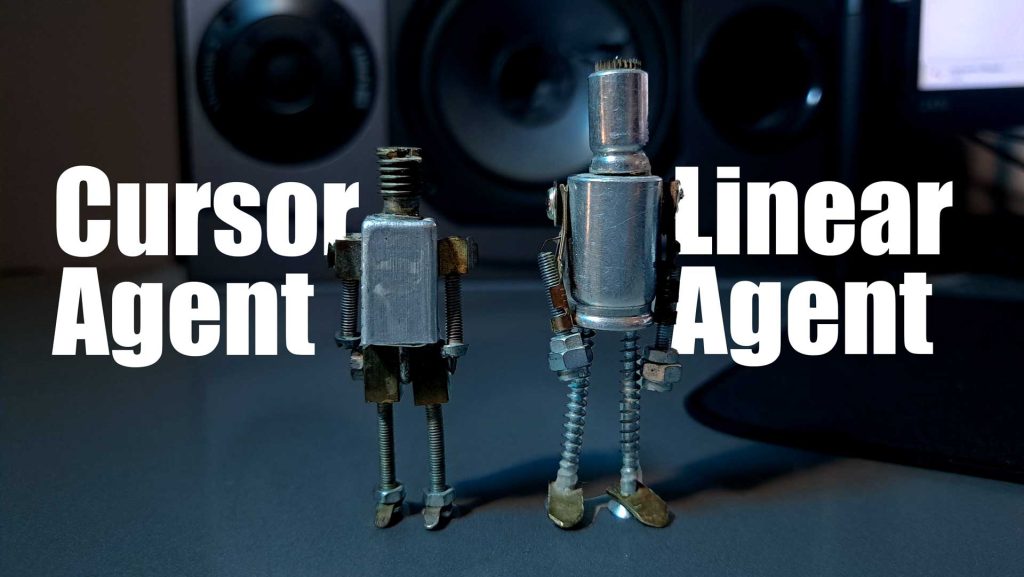
In this article, I briefly describe how a product manager with a tech background (who understands software development) can use the Linear project management and product management tool, and Cursor to build a practical software prototype, or an early version of a software product or a software solution. The example is intentionally simple: a private editorial WordPress plugin. The purpose is not to teach WordPress plugin development in full. The purpose is to show a repeatable operating model for a small AI-driven software team.
Linear describes itself as a product development system built for modern teams with AI workflows, including workflows shared by humans and agents.
Cursor positions its product as a way to build software with AI, and its Agent can complete coding tasks, edit files, run terminal commands, and search the codebase.
The most interesting part is not each tool alone. The interesting part is what happens when we combine them into a disciplined workflow.
Table of Contents
1. The short answer: What is AIDD?
AI-Driven Development is a software delivery model in which humans define goals, constraints, quality rules, and acceptance criteria, while AI agents help refine work, write code, create pull requests, and support reviews.
It is not “let AI build everything.”
It is not “replace the developer.”
It is not “vibe coding in production.”
AIDD works when there is a clear operating system:
- structured product work
- agent-ready issue
- controlled coding Agent
- pull request
- human review
- local or staging verification
- merge
In my current workflow, Linear is the headquarters for product and delivery. Cursor is the coding Agent. GitHub is the code and review layer. LocalWP is the local WordPress verification environment. The human remains the owner, reviewer, tester, and final decision-maker.
That distinction matters. The faster the Agent works, the more important the human control loop becomes.
2. Why Linear project management fits the AIDD workflow
Traditional project management software was designed mainly for people. Tickets were written for developers, testers, project managers, and clients. But agents need a different level of precision.
An AI coding agent does not benefit from vague tickets such as:
Build editorial plugin.It needs something closer to this:
Scaffold a private WordPress plugin.
Keep the repository limited to the plugin folder.
Do not implement business features yet.
Add a valid plugin header.
Add Composer and PHPCS configuration.
Add Cursor project rules.
Open one pull request.
Include LocalWP test steps.
This is where Linear project management becomes useful. Linear projects are designed as units of work with clear outcomes or planned completion dates, comprising issues and optional documents. Linear also supports project templates for repeated projects with predefined issues and milestones, as well as issue templates that help teams file work consistently.
For product managers, this is important. You can turn your thinking into a reusable delivery structure.
Instead of asking, “Can AI build this?” ask:
Can I describe this work clearly enough that an agent can attempt it,
and a human can review it safely?
That is the AIDD question.
3. The new AI-driven software team model
In a small AI-driven company, the organizational chart can be surprisingly simple. The human does not disappear. The human moves up the value chain.
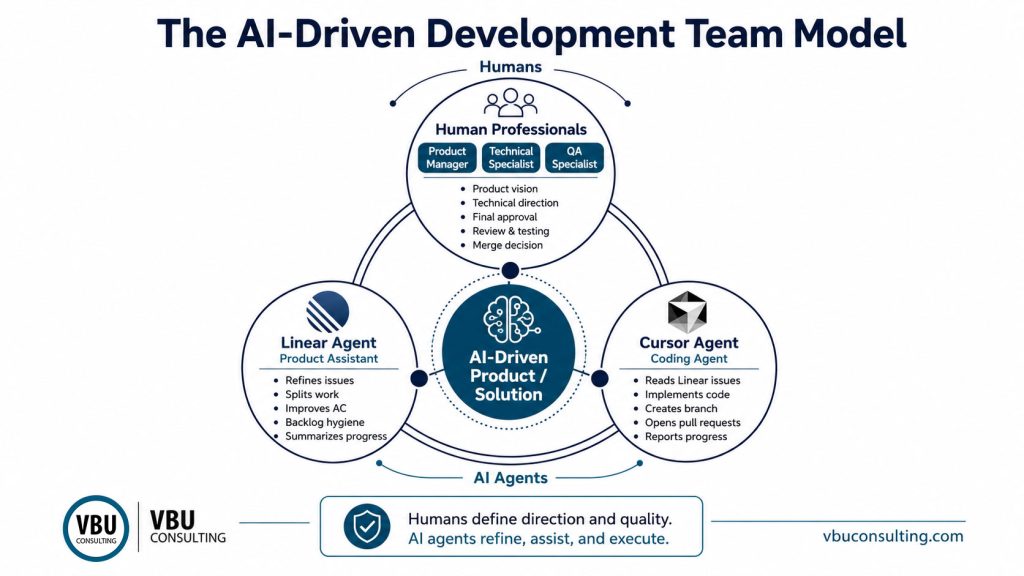
This model does not remove developers. In fact, strong developers become more valuable in planning and review. They help define constraints, architecture, naming conventions, database rules, security boundaries, and what the Agent must not touch.
A junior product manager may write:
Create an admin page.A strong technical person may add:
Check user capabilities, use nonces for state-changing admin actions, sanitize input, escape output, and do not create custom tables unless the issue explicitly requires it.That technical precision can make the difference between a useful AI-generated prototype and a risky codebase.
Linear’s agent guidance feature is designed to provide agents with instructions on team conventions, repository choice, issue references in commits or pull requests, and the review process. Cursor Rules provide persistent instructions to the Agent; project rules are stored in .cursor/rules, version-controlled and scoped to the codebase.
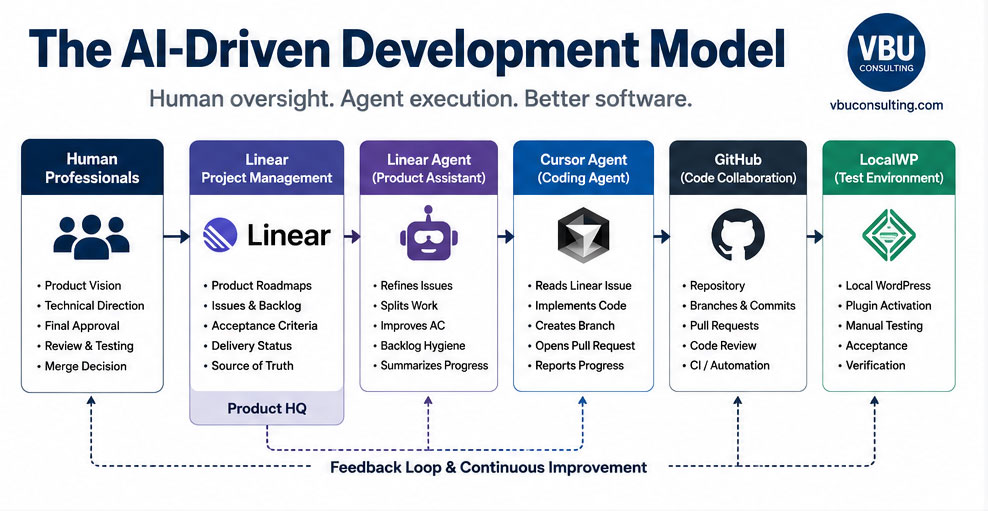
The new “team process” clearly encompasses not just meetings and tickets. It also incorporates reusable instructions.
4. The practical scenario: building a private editorial WordPress plugin
Let us imagine that I want to build a private editorial WordPress plugin for a media website.
The plugin is not for the public WordPress plugin directory. It is a private tool for improving internal editorial work. Later, it may include custom post types, custom fields, admin screens, shortcodes, REST endpoints, Gutenberg blocks, and integrations with external services. But the first version should not try to do everything.
The first goal is smaller:
Create a clean, activatable WordPress plugin scaffold
that can be developed through Linear, Cursor, GitHub,
and LocalWP.
This is a good first AIDD experiment because the boundaries are clear. WordPress has a known plugin structure. The plugin can be tested locally. The first pull request can be small.
WordPress states that, at its simplest, a plugin is a PHP file with a WordPress plugin header comment, and it recommends creating a directory to keep plugin files organized. WordPress also documents the main plugin header fields, including plugin name, version, required WordPress version, required PHP version, author, text domain, and update URI.
So the first milestone is not “build the product.”
The first milestone is “prove the operating model.”
5. A Practical 7-Step Guide to Implementing the AI-Driven Development Model
The AI-Driven Development model becomes useful only when it is translated into a repeatable working process. In the next seven steps, I will show how to move from the team model into a practical setup where Linear becomes the product and delivery headquarters, Cursor becomes the coding Agent, GitHub keeps the code reviewable, LocalWP provides the testing environment, and the human professional remains responsible for direction, review, and final decisions. This short guide introduces the working sequence before we go into each step in detail.
- Step 1: Create a narrow repository boundary
- Step 2: Set up Linear as the source of truth
- Step 3: Use Linear templates for digital collaboration
- Step 4: Add Cursor project rules
- Step 5: Write the first issue
- Step 6: Delegate the issue to Cursor
- Step 7: Review before merging
Step 1: Create a narrow repository boundary
The most important technical decision is where the repository lives.
For an MVP, I would create the Git repository directly inside the WordPress plugin directory:
wp-content/
└── plugins/
    └── vbu-private-editorial-tools/   ← Git repository root
I would not open the entire WordPress installation in Cursor. I would not version-control WordPress core, uploads, cache files, LocalWP internals, themes, and third-party plugins.
The repository boundary is an agent-safety boundary.
A human developer usually understands that the WordPress core should not be edited. An AI agent needs that boundary to be explicit. When Cursor opens only the plugin folder, the Agent has less irrelevant context and fewer opportunities to change the wrong files.
The rule is simple:
Allowed:
- Custom plugin files
- README
- Composer config
- PHPCS config
- Cursor rules
- Tests
- Plugin assets

Not allowed:
- WordPress core
- Third-party plugins
- Active theme
- Uploads
- LocalWP internals
- Secrets
- Production data
This one decision can prevent many future problems.
Step 2: Set up Linear as the source of truth
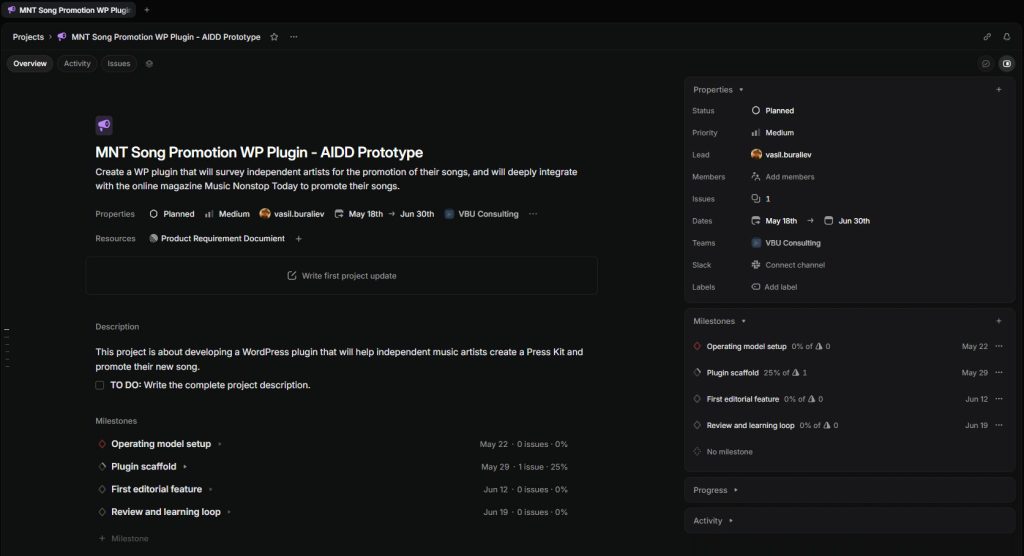
I would create a Linear project:
MNT Song Promotion WP Plugin - AIDD PrototypeThen I would create milestones:
1. Operating model setup
2. Plugin scaffold
3. First editorial feature
4. Review and learning loop
For a small product team, I recommend a workflow like this:
Backlog
- Backlog

Unstarted
- Ready for Spec

Started
- Spec in Progress
- Ready for Dev
- In Dev
- Ready for LocalWP Test
- Changes Requested
- Ready to Merge

Completed
- Done

Canceled
- Canceled

Duplicate
- Duplicate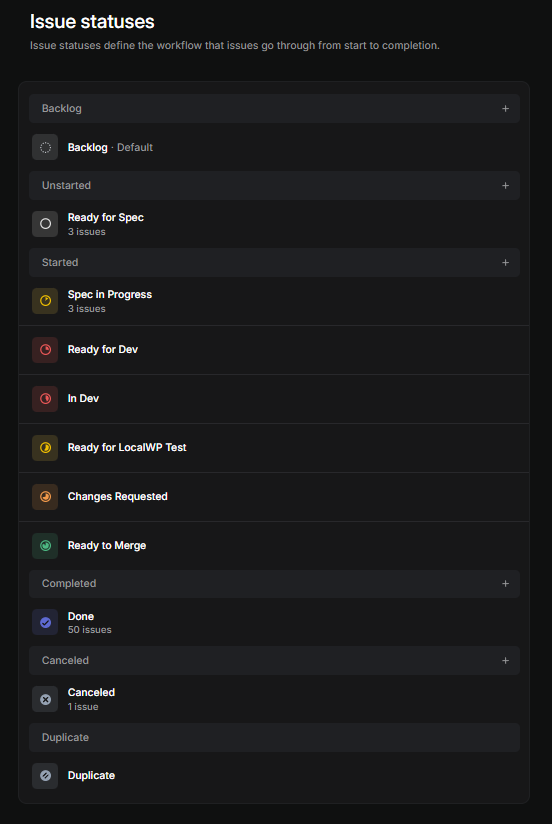
This is how to implement Linear project management in small teams: keep statuses simple, make the handoff to development explicit, and never hide the human testing step.
A small team does not need a heavy process. It needs visible ownership.
For AIDD, the most important status is probably Ready for Dev – that’s why I marked it with red color so that I’ll be able to spot those issues (work items) easily in the issues’ views. That status should mean the issue is agent-ready. It has context, scope, non-goals, acceptance criteria, technical constraints, and a test plan.
Step 3: Use Linear templates for digital collaboration
Linear project management templates for digital collaboration should help people and agents work from the same structure.
I recommend three templates.
- Linear project template
This template gives every new AIDD project (and specifically for creating a WP Plugin) the same structure from the beginning. It prevents you from starting with an empty project and improvising at every step. - Linear issue template for Cursor Agent
This is the most important template. Linear says standard templates let you set issue properties and provide reusable context in the description. - Linear agent guidance template
NOTE: The templates are in Markdown format – the most suitable format for AI.
1. Linear project template
Use this for repeated projects (Workspace > Settings > Your Teams > Issues, Projects, and Docs > Templates):
# Project: [Project Name]

## Purpose
What are we trying to prove?

## Human owner
Who makes the final product and merge decisions?

## Repository
Where does the code live?

## Milestones
1. Operating model setup
2. Scaffold
3. First feature
4. Review and learning loop

## Definition of ready
- Context is clear
- Scope is small
- Non-goals are listed
- Acceptance criteria are testable
- Repository boundary is defined
- Test plan exists

## Definition of done
- PR created
- Human reviewed
- Local test completed
- Follow-up issues created
When you create a new Linear project, choose this template instead of creating a blank project.
2. Linear issue template for Cursor Agent
I recommend creating it at the Team level first (you can set the template at the Linear level) because this workflow is likely tied to a specific delivery or product team.
This template turns a normal issue into an agent-ready contract. It helps the product manager avoid weak issues like:
Build the plugin.Instead, it forces the issue to include the information Cursor Agent needs:
Context
Goal
Scope
Non-goals
Technical constraints
Acceptance criteria
Test plan
Expected PR output
This is my recommended issue template:
## Context

Explain the business and technical background.

## Goal

State the desired outcome in one or two sentences.

## Scope

- What should be changed?
- Which files or areas are likely involved?
- What behavior should exist after this task?

## Non-goals

- What should not be implemented in this PR?
- What should be deferred?

## Technical constraints

- Repository: [repo-name]
- Target PHP: 8.2
- Follow WordPress Coding Standards
- Sanitize input
- Escape output
- Check capabilities before admin actions
- Use nonces for state-changing actions
- Do not modify WordPress core, third-party plugins, uploads, LocalWP configuration, or theme files

## Acceptance criteria

- [ ] Plugin activates without fatal errors.
- [ ] PR stays inside the plugin repository.
- [ ] Manual LocalWP test steps are included.
- [ ] Known limitations are documented.

## Expected PR output

One branch. One pull request. Clear summary. Test notes.
When you create a new implementation issue in Linear, use this issue template.
Linear supports creating an issue from a template using Option/Alt + C, or by holding Option/Alt and clicking the create issue icon.
IMPORTANT: This issue should not be assigned to Cursor until it is clear enough. In the workflow, this is what Ready for Dev means.
3. Linear agent guidance template
Linear is the source of truth for requirements, acceptance criteria, and delivery status.

GitHub is the source of truth for code, commits, branches, and pull requests.

Use Linear Agent for:
- issue refinement
- issue splitting
- backlog hygiene
- summaries
- release notes

Use Cursor Agent for:
- coding tasks
- branch creation
- code changes
- pull request preparation

Every coding issue must include context, scope, non-goals, acceptance criteria, technical constraints, and a test plan.
These templates are not bureaucracy. They are prompt engineering inside a real project management system.
Step 4: Add Cursor project rules
Before asking Cursor to write code, I would add project rules.
Cursor’s Agent works from instructions, tools, and the selected model; the tools include file editing, codebase search, terminal execution, browser control, and more. That power is useful only when the boundaries are clear.
Create:
.cursor/rules/wordpress-plugin.mdAdd rules like this:
# Private Editorial WordPress Plugin - Cursor Rules

This repository is a private WordPress plugin.

## Boundaries

- Work only inside this plugin repository.
- Do not modify WordPress core.
- Do not modify third-party plugins.
- Do not modify theme files unless the Linear issue explicitly requires it.
- Do not add secrets, API keys, tokens, or passwords.

## Standards

- Target PHP 8.2.
- Follow WordPress Coding Standards.
- Use a project namespace.
- Prefix options, meta keys, hooks, nonces, and transients.
- Escape output.
- Sanitize input.
- Check user capabilities before admin actions.
- Use nonces for forms and state-changing admin actions.

## Workflow

- One Linear issue per branch.
- Keep PRs small.
- Include LocalWP test steps.
- Do not implement extra features outside the issue.
- When uncertain, document assumptions in the PR.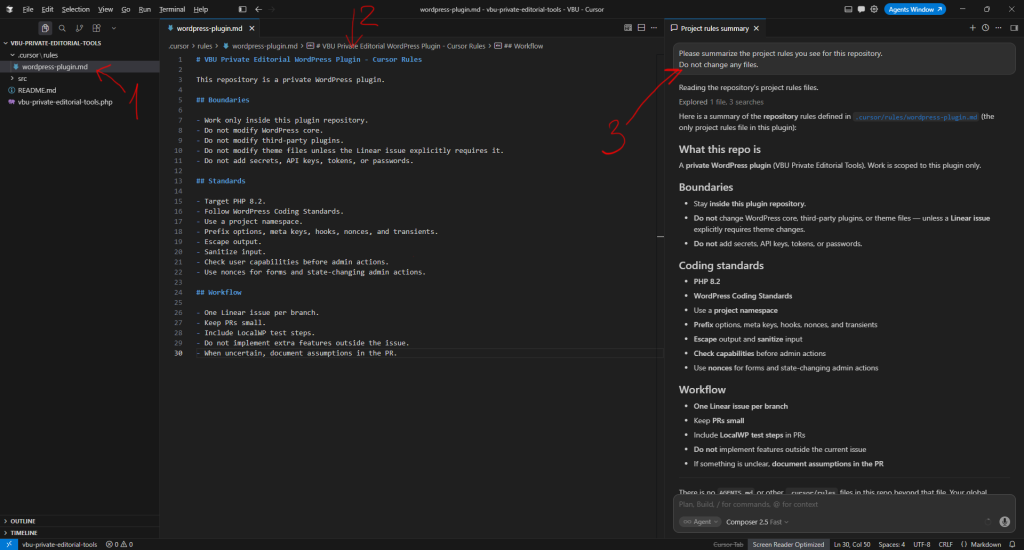
Step 5: Write the first issue
The first issue should be intentionally boring.
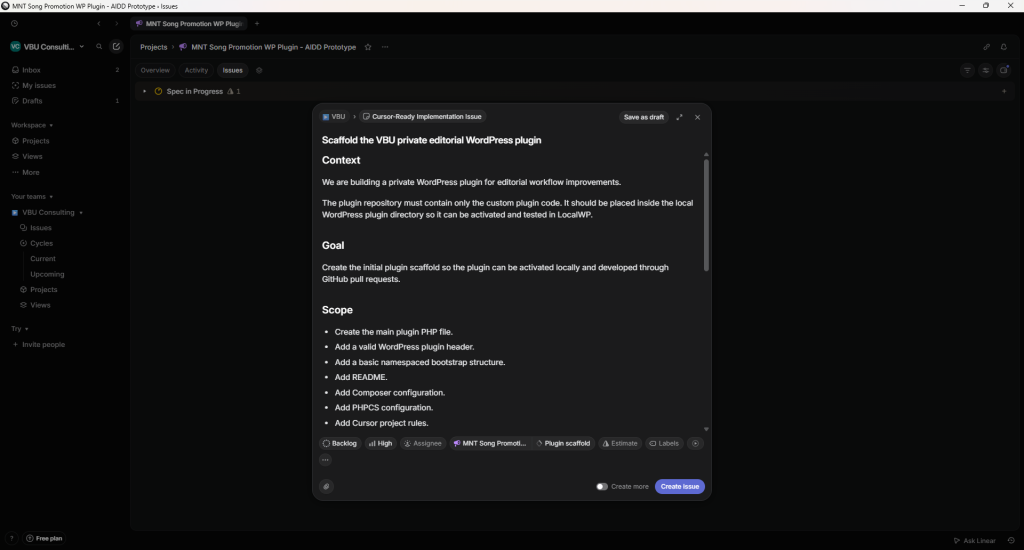
So, let’s get back to Linear’s project, create a new issue, choose the previously created template, and keep the template structure to define the issue.
# Scaffold the VBU private editorial WordPress plugin

## Context

We are building a private WordPress plugin for editorial workflow improvements.

The plugin repository must contain only the custom plugin code. It should be placed inside the local WordPress plugin directory so it can be activated and tested in LocalWP.

## Goal

Create the initial plugin scaffold so the plugin can be activated locally and developed through GitHub pull requests.

## Scope

- Create the main plugin PHP file.
- Add a valid WordPress plugin header.
- Add a basic namespaced bootstrap structure.
- Add README.
- Add Composer configuration.
- Add PHPCS configuration.
- Add Cursor project rules.
- Do not implement business features yet.

## Non-goals

- No custom post types yet.
- No admin UI yet.
- No REST endpoints yet.
- No Gutenberg blocks yet.
- No external API integrations yet.

## Acceptance criteria

- [ ] The plugin appears in WordPress Admin > Plugins.
- [ ] The plugin activates without fatal errors.
- [ ] The PR changes only the plugin repository.
- [ ] README explains local installation and activation.
- [ ] PR includes LocalWP manual test steps.

## Test plan

1. Pull the branch locally.
2. Start the LocalWP site.
3. Open WordPress Admin.
4. Go to Plugins.
5. Activate the plugin.
6. Confirm no fatal error.
7. Confirm the homepage still loads.
This is a good issue because it is small, reviewable, and safe.
Step 6: Delegate the issue to Cursor
The Linear and Cursor integration allows a Linear issue to be assigned to Cursor; Cursor then starts a cloud agent, works in the context of the issue, and reports progress back to Linear. Cursor’s own Linear integration description says work can be triggered by assigning an issue to @Cursor or mentioning @Cursor in a comment, and the agent can open a pull request when finished.
The comment can be simple:
@Cursor Please implement this issue in the VBU private editorial plugin repository.The best result is not a magical finished product. The best result is one clean branch and one pull request that can be reviewed.
Step 7: Review before merging
This is the part many teams will be tempted to skip. Do not skip it! The human review loop is the core of responsible AIDD.
Tip for young Padawans: Avoid skipping the review and add one more step to the list below. Keep the Agent chat open and set to Ask mode so you can clarify and understand the parts of the instructions and the logic in the code – put yourself in a learning mode. Your organization and the world need Jedi. Yes, it requires time, focus, and energy, but being a Jedi is not easy, and you want to be one, right? So, learn more you must, young Padawan!
- Read the Linear issue again.
- Read the PR summary.
- Check changed files.
- Confirm the PR stayed inside the plugin repository.
- Run linting if available.
- Pull the branch locally.
- Start LocalWP.
- Activate the plugin.
- Test the acceptance criteria.
- Request changes or merge.
In a traditional team, review protects quality. In an AI-driven team, review protects quality, scope, security, and trust.
6. What are the best AI-driven tools for project management?
For this workflow, I would not choose one tool. I would choose a system:
- Linear project management tool
product work, issue templates, project structure, agent guidance - Cursor
coding agent, repository-aware implementation, pull request creation - GitHub
source control, branches, pull requests, review history - LocalWP
local WordPress verification - ChatGPT or Perplexity
research, alternative explanations, documentation support, and planning assistance
Linear also has an agents ecosystem where agents can be assigned to issues or mentioned in comments, and its integrations directory includes Cursor and other coding or product agents.
For product managers, the key is not to collect many tools. The key is to decide which tool owns which part of the workflow.
7. Where can I download templates for a traditional project management plan?
For traditional project management plan templates, I would not reinvent the wheel. PMI provides project management templates and tools, and ProjectManagement.com offers a project plan template describing how a project will be delivered, what will be delivered, how the work will be accomplished, risks, resources, milestones, assumptions, and constraints. Atlassian also provides project management templates for phases such as initiation, planning, execution, monitoring, and closure.
But for AIDD, a traditional project plan is not enough. You also need agent-ready templates: Linear issue templates, Linear agent guidance, Cursor rules, and PR review templates.
That is why I created an AIDD Linear + Cursor template pack for this workflow, which you already got familiar with in the previous chapters of this article.
8. Where to start if you want to implement AIDD in your company
Do not start with a company-wide transformation. Start with one product manager, one small repository, one controlled prototype, and one well-written issue.
My recommended first 10 steps are:
- Select a small internal product, such as my WP plugin example.
- Create a dedicated Linear project.
- Define simple statuses.
- Add Linear issue templates.
- Add Linear agent guidance.
- Create a small GitHub repository.
- Add Cursor project rules – set your AI developer mindset.
- Write one scaffolding issue.
- Delegate it to Cursor.
- Review and test before merging.
After that, improve the system. Update the Cursor rules when the agent repeats a mistake. Improve the Linear template when the issue was misunderstood. Add technical review where architecture matters. Keep developers involved in constraints and design. Keep the human responsible for final decisions.
AIDD is not about replacing discipline with automation. It is about making discipline executable.
If your organization already has product managers, developers, and project managers, you do not need to throw that away. You need to redesign how work is described, delegated, reviewed, and improved.
That is where the opportunity is.
The AI-driven software company will not be the company that blindly trusts agents. It will be the company that learns how to combine human judgment with agent speed.
9. FAQ
What is AI-Driven Development?
AI-Driven Development is a software delivery approach where humans define the goal, scope, constraints, and quality bar, while AI agents help refine issues, write code, create pull requests, and support delivery.
What are the best AI-driven tools for project management?
For small software teams, a practical stack is Linear for product/project management, Cursor for coding agents, GitHub for pull requests and review, and ChatGPT, Gemini, or Perplexity for research and planning support.
How do you implement Linear project management in small teams?
Start with one Linear project, simple statuses, issue templates, clear ownership, and a rule that no issue moves to development until it has context, scope, non-goals, acceptance criteria, constraints, and a test plan.
Is Linear a project management tool or an issue tracker?
Linear is a product development and issue tracking system that supports projects, issues, documents, templates, and AI-agent workflows. In an AIDD workflow, it becomes the source of truth for product and delivery work.
Can a product manager build a prototype with Linear and Cursor?
Yes, especially for a small prototype with clear boundaries. The product manager still needs to define the problem, write precise issue descriptions, review pull requests, and test the results. Technical review is recommended when architecture, security, or production risk is involved.
Should Cursor open the whole WordPress installation?
No. For a private plugin prototype, Cursor should open only the plugin repository. This reduces noise and prevents the Agent from modifying WordPress core, uploads, themes, third-party plugins, or local configuration files.
What Linear project management templates should I use for digital collaboration?
Use a project template, an agent-ready issue template, an agent guidance template, and a PR review checklist. These templates help humans and agents work from the same expectations.
Where can I download templates for a traditional project management plan?
You can find traditional project management plan templates from PMI-related resources, ProjectManagement.com, Atlassian, and similar project management libraries. For AIDD, also use the agent-ready Linear and Cursor templates, as traditional plans do not specify how AI agents should work.
☕Would you support my work if I promise that I’ll continue this story about the WP plugin, developing this small project until the end?
If you are eager to test Cursor, I have a referral link (🛒), which gives you a 50% discount on your first month if you are not already signed up for this tool.